
IGOR is a cloud-based ELN with integrated LIMS capabilities. Each experiment links to its protocol, data files, samples and metadata, so your team’s work stays connected in one place.







Cloud-based ELN and LIMS for research teams
IGOR gives your team one place to document experiments, track samples and reagents, organize data, and manage research projects. It combines a cloud-based electronic lab notebook (ELN) with a laboratory information management system (LIMS), so protocols, files, materials and results stay connected.

You can configure the workspace to your team's needs and standardize data capture across experiments, without coding knowledge or vendor support.

Plans start at $30 per user per month, billed annually, and most teams are up and running within days to a couple of weeks, depending on team size and how much data they want to migrate.
IGOR includes an electronic lab notebook, inventory and sample tracking, SOPs and templates, Collaboration Workspaces, a project manager, and electronic signatures with audit trails and access control.
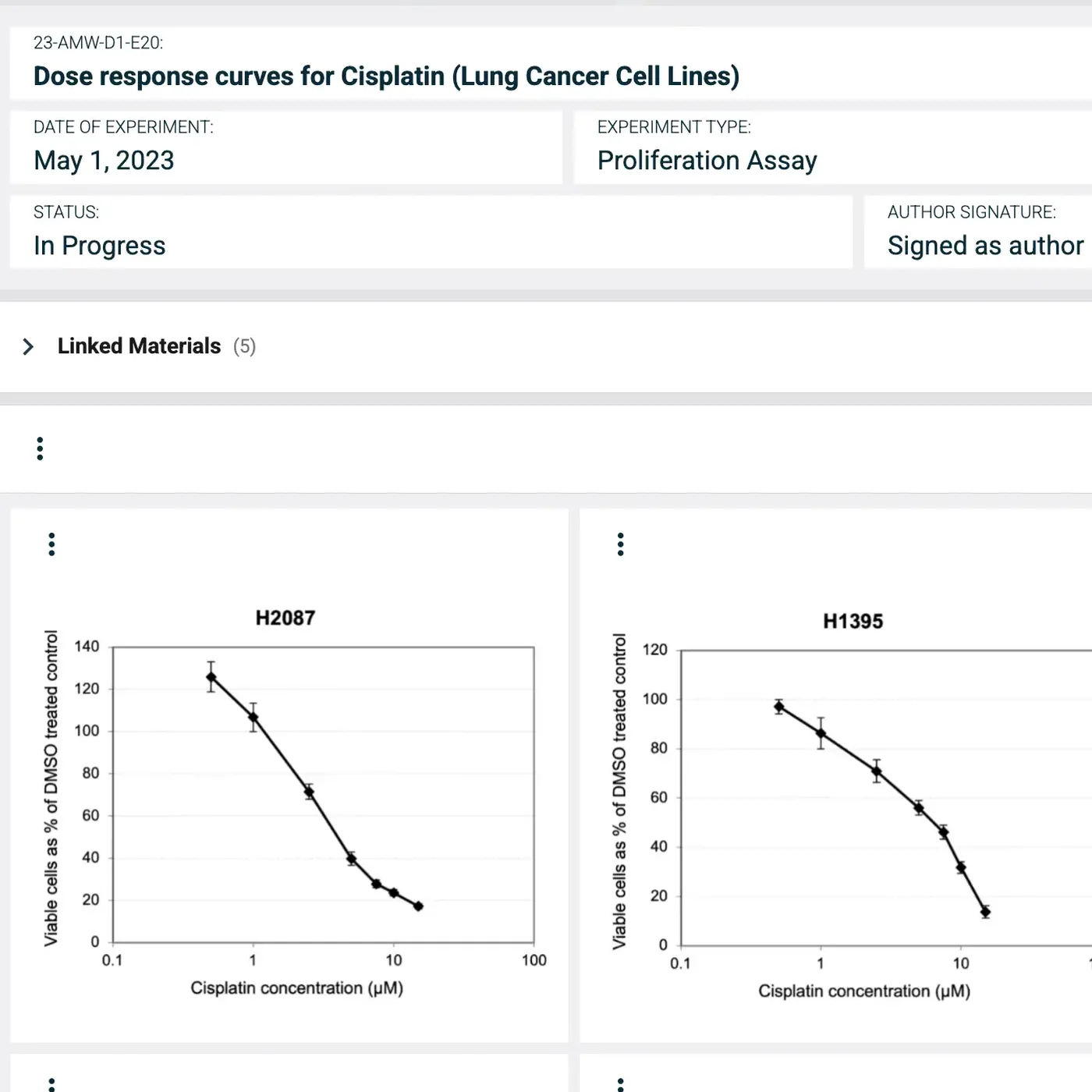
IGOR's electronic lab notebook is where each experiment is recorded, with all relevant context attached to the entry. Entries are time-stamped, signed and witnessed with electronic signatures, and they lock once witnessed.

Capture metadata for every experiment in fields your team defines, then search past work by assay, cell line or any parameter you set.
Record methods and results in text, data tables with formula support and annotated image galleries.
Open any linked sample to see where it's stored, which experiments used it and who handled it.
Attach any file type, including raw instrument data and scanned notebook pages.
Bring existing data in easily. Import Excel or CSV files, such as an instrument export, straight into a data table, and paste text in from Word or PDF documents.
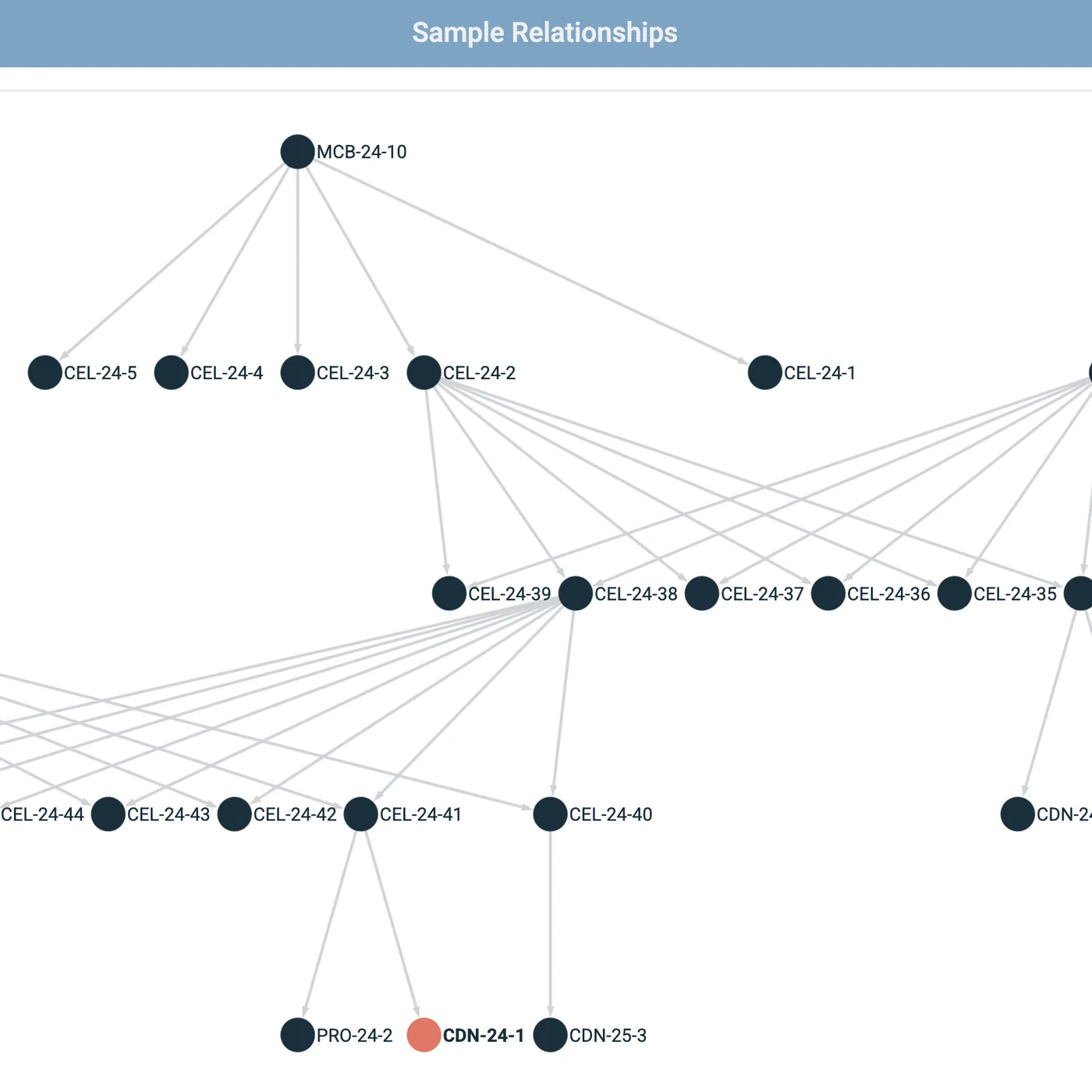
IGOR's inventory gives every sample and reagent its own record with a unique ID and a full audit trail. Samples link to the experiments they were used in, so you can trace a result back to the vial it came from.

Set up a repository for each sample type with your own metadata fields, such as origin, concentration or supplier.
Storage locations from facility down to box position, with a box map that shows which positions are taken and where new samples will fit.
Optional quantity tracking, item by item. IGOR logs every amount used and notifies the designated people when an item reaches its notify threshold.
Complete sample history for traceability. Every action on a sample is recorded with who did it and when.
Relationship mapping to track sample lineages. An interactive family tree links parent and child samples across repositories.
In IGOR, an SOP sets out how to run an assay and a template sets out what to record. Attach both to an experiment and everyone follows the same method and captures the same data, so results stay comparable from person to person.
Standardize data capture with a template for each assay. Scientists start from it and only fill in what's new.
Only approved SOPs reach the bench. Each SOP goes through a formal review and approval process with electronic signatures before anyone can use it. Outdated versions can be archived but remain in the system for future audits.
One set of documents for the whole team. SOPs and templates are shared within your Collaboration Workspace.
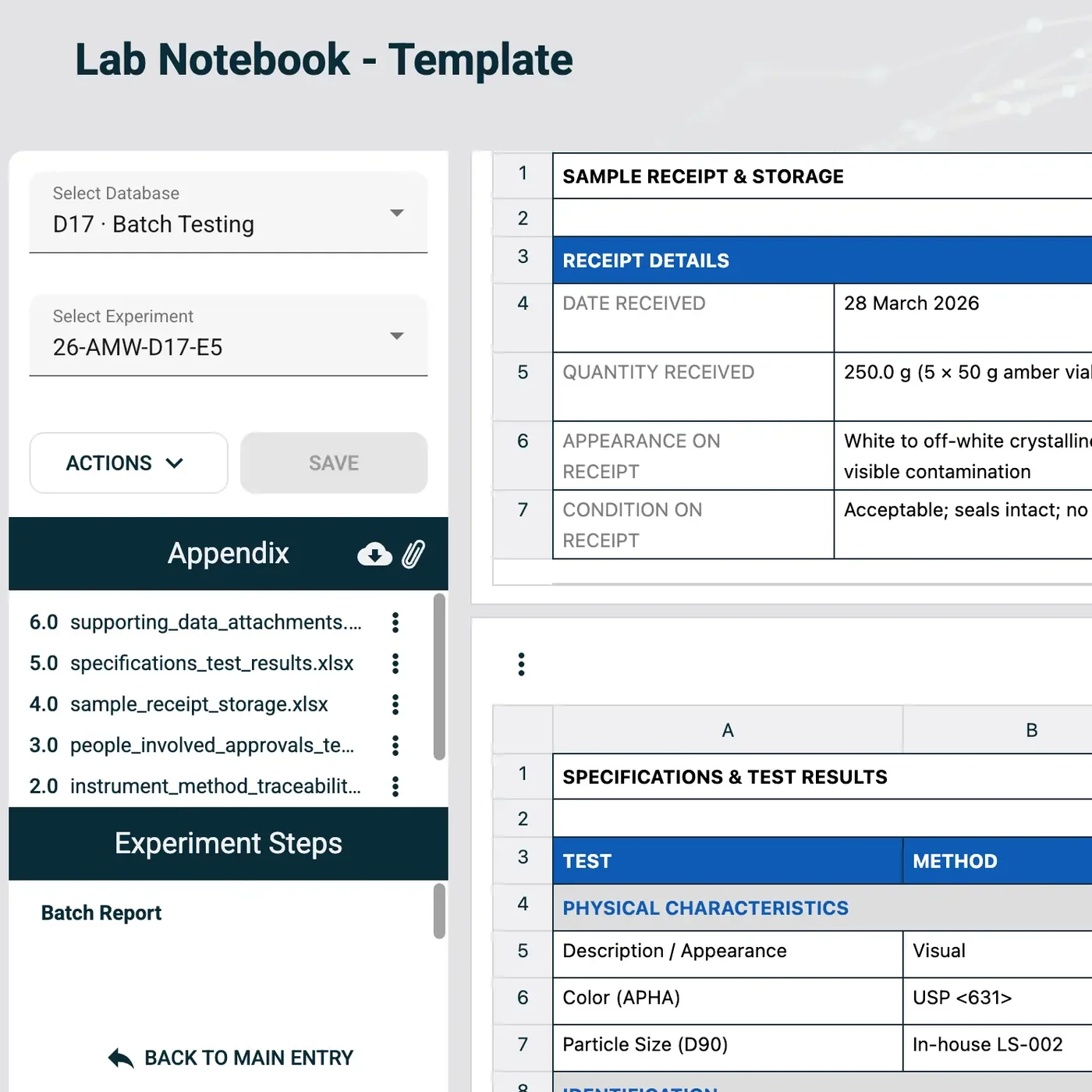
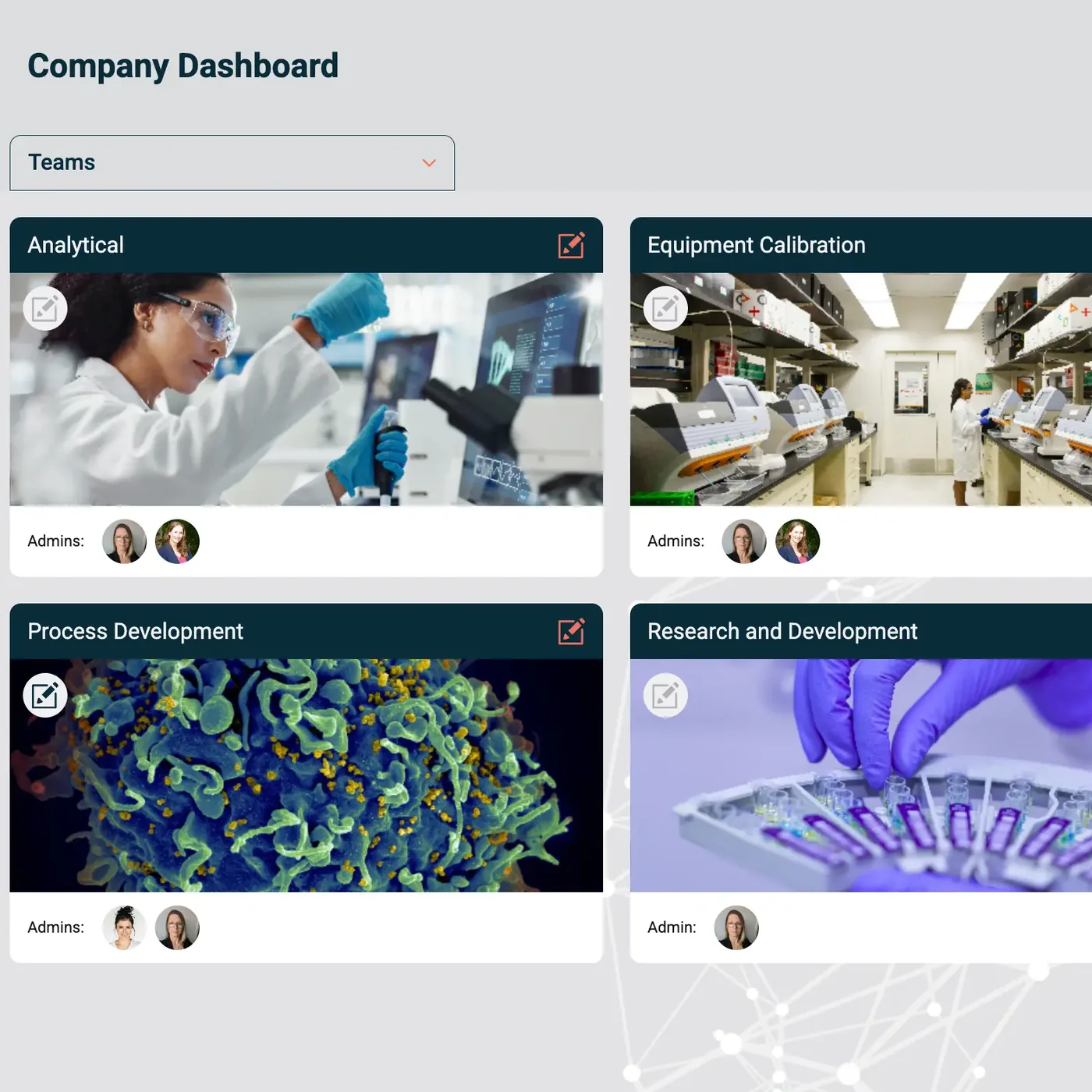
Within your organization's IGOR account, each department or project group can create its own customizable Collaboration Workspace. Teams decide how to organize their work, which metadata to track, who has access, and which SOPs and experiment templates to use, and they can still share data when needed.
Securely share data across teams, departments, or sites, including SOPs, experiment templates, and inventories.
Run quality control with witnessing workflows for notebook entries and review and approval workflows for SOPs.
Preserve team knowledge. Past members' data and documentation stays searchable and accessible.
Adjust your setup at any time with point-and-click tools, without coding or vendor support.
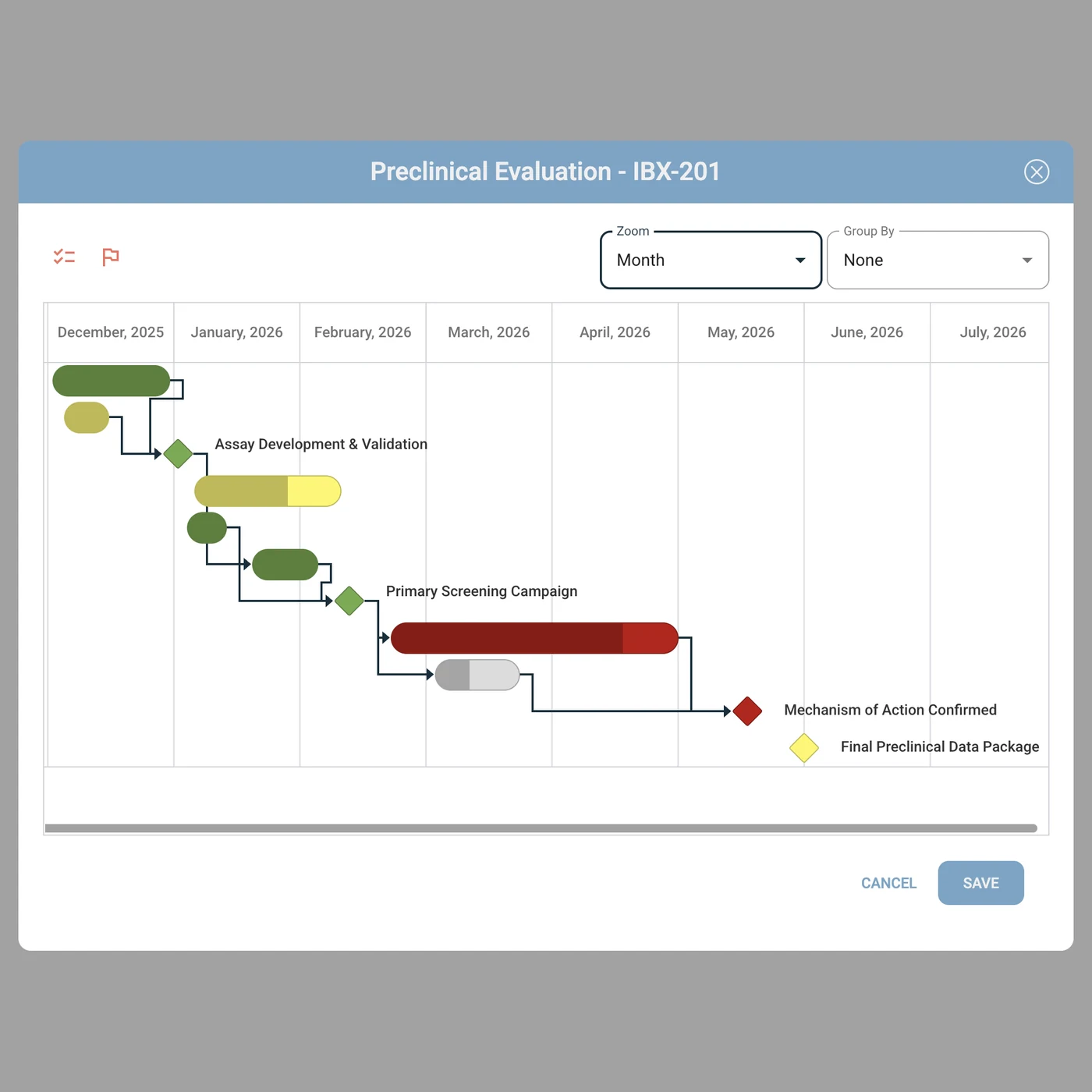
On most research projects, the plan lives in one place, the experiments in another, and updates travel by email. IGOR's Project Manager keeps the plan, task status and experiments together, so everyone on the project can see how the work is going.
Plan the project as tasks and milestones, each with a timeline, priority and status, and set dependencies to show which tasks rely on others.
Assign each task to a person, so it's always clear who is responsible, and everyone on the project sees its status update in real time.
Flag bottlenecks early by leaving comments on tasks and milestones for the rest of the team.
Link tasks to the experiments behind them and open the notebook entries straight from the project plan.
Only assigned collaborators can see a project, even when it spans several departments or a partner organization.
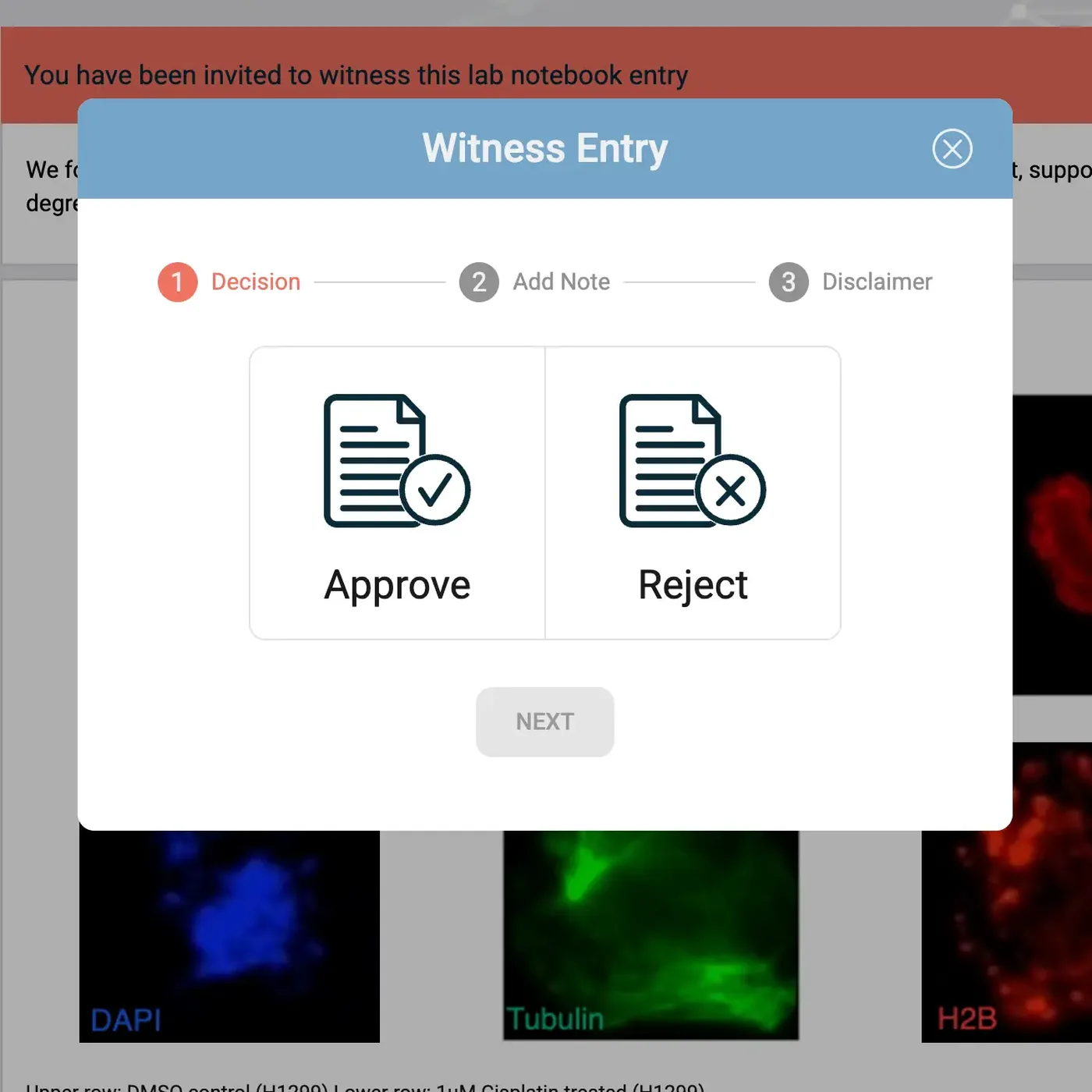
IGOR gives your team the technical controls for regulated work, built into the notebook they use every day.
Electronic signatures compliant with 21 CFR Part 11 for signing and witnessing notebook entries.
Entries locked after witnessing. Any later correction is made in a revision that records the reason for the change.
A full witnessing history for every notebook entry, showing who witnessed it and when, plus any comments or rejections.
Review and approval workflows for SOPs, each with its own approval history and audit trail.
Full version history for every notebook entry, and a complete history for every sample that records each action, who took it and when.
Role-based access control, enforced in the application and at the database level through row-level security.
With the IGOR mobile app for iOS and Android, you can photograph observations at the bench or scan handwritten notes and send them straight to the right experiment. Images are cleared from the phone once they're uploaded or the app is closed, so no lab data stays on personal devices.
Discover the mobile app ❯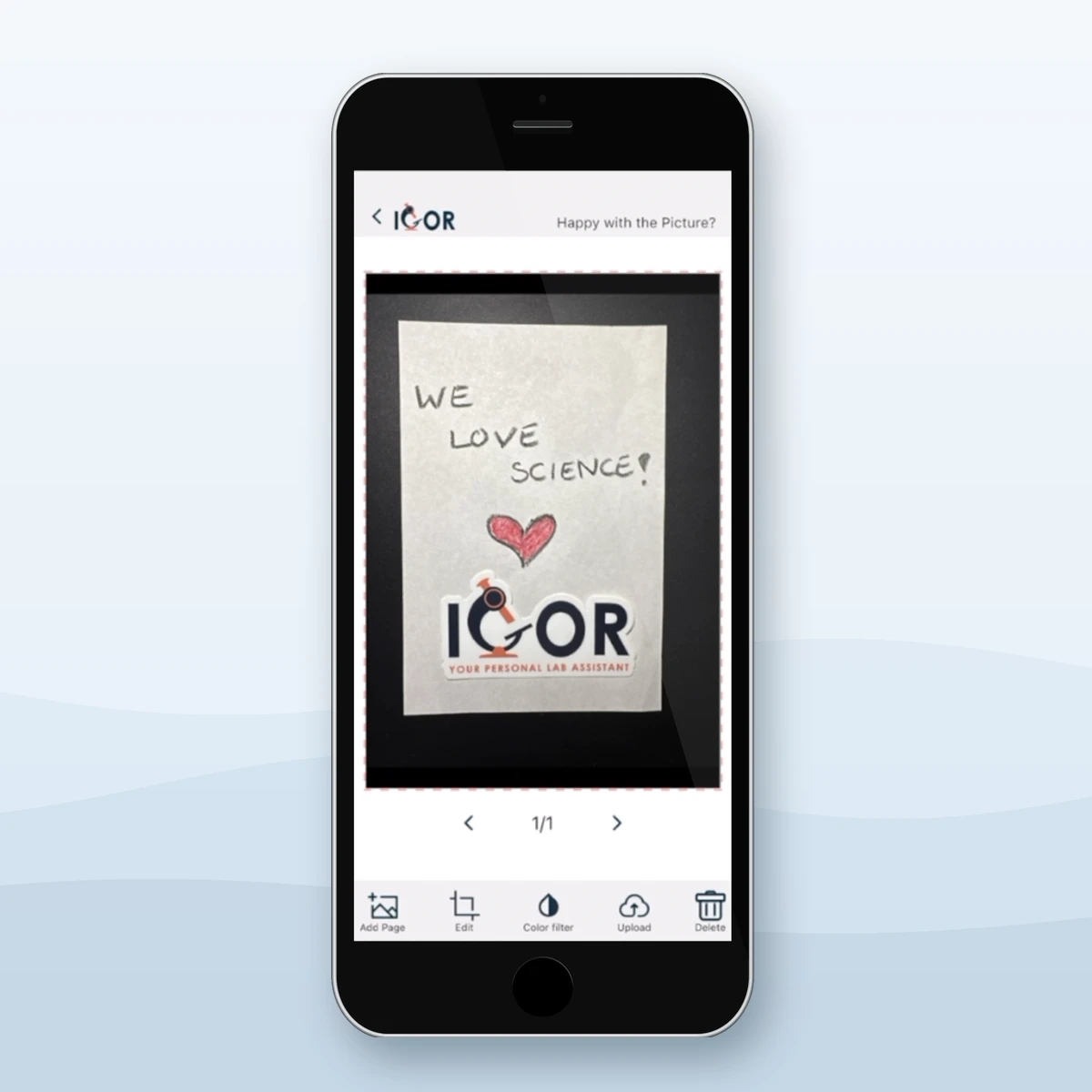

> 50%
Time Saved on administrative tasks.
"As CEO, I'm not in the lab day-to-day anymore, but it's important for me to stay connected to what's happening across our projects. IGOR makes that easy. The team loves using it because it's intuitive and fits seamlessly into their workflow. We can document experiments and SOPs quickly and with minimal effort, which has drastically cut down the time spent on administrative tasks and given us more time to focus on experiments and data analysis. I also really value being able to track progress and review entries quickly from anywhere with an internet connection. That level of visibility and accessibility just isn’t possible with paper-based notebooks. Overall, it’s been a great addition to how we operate. Their customer support is amazing too, always ready to assist with any queries. I cannot recommend it enough."


IGOR supports our adherence to
OECD GIVIMP recommendations
100%
"Best decision ever! As a small team, we don’t have the luxury of spending weeks in training sessions, therefore IGOR was a perfect match.
IGOR is incredibly intuitive. From day one, every member of our team was able to use it without issue, and the enthusiasm was immediate. We purchased our license just two weeks after becoming GIVIMP certified, and adapting IGOR’s functionality to meet GIVIMP requirements was seamless. Looking ahead, we’re expanding to two additional labs in different countries, and we’re excited that IGOR will make it easy to track and coordinate progress across all sites. We evaluated multiple platforms during our due diligence process, and IGOR stood out as the clear number one."

"IGOR is the perfect ELN and inventory system for start-ups and medium-sized biotech companies, as well as regulated labs. The platform is powerful yet budget-friendly, combining time-stamped ELN functionality with an integrated inventory system that makes managing both R&D and QC labs efficient and straightforward. The interface is very user-friendly, and features like experiment templates, cross-referencing, and built-in data integrity tools ensure compliance while supporting a smooth research workflow. Overall, it’s well organized, easy to learn, and packed with valuable features at a very reasonable price."



IGOR gives growing research teams enterprise-grade tools at startup-friendly prices, with three pricing plans to choose from: Academia at $30, Professional at $80 and Momentum at $100 per user per month when billed annually. Monthly billing is available at 20% more. There are no setup fees and no seat minimums, and personal onboarding and support are included in every plan.
See Transparent Pricing ❯
Most teams are up and running within days or a couple of weeks, depending on team size and how much data they want to migrate before go-live.

Personal onboarding is included in every plan and runs over several days, so your team learns IGOR one part at a time.

Your scientists set up fields, templates and permissions themselves via IGOR's intuitive point-and-click interface.

Excel/CSV files import into notebook tables, inventory uploads in bulk, and scanned paper notebooks can be stored as PDFs.

We work with you to set up your workspace during onboarding, and we’re always happy to help whenever a question comes up after that.
Book a personal demo, and we'll walk you through IGOR with an example experiment, from the notebook entry to the samples and SOPs behind it. Bring your questions, and we'll talk through what your team's workflows could look like in IGOR.
“We can document experiments and SOPs quickly and with minimal effort, which has drastically cut down the time spent on administrative tasks and given us more time to focus on experiments and data analysis.”
John Curd, CEO, Peptimatrix Ltd

Lab Software Guides
Which platform fits depends on why you’re leaving Benchling. Ten options, compared side by side.
Read article ›
Research Workflows & Documentation
What every entry needs so someone else can repeat your work without asking you.
Read article ›
Lab Software Guides
Five ELN and LIMS platforms compared, plus what to ask about moving your Labguru data.
Read article ›
Lab Management
What to ask vendors about hidden costs, data export and what happens when startup pricing ends.
Read article ›
IGOR is a cloud-based electronic lab notebook (ELN) and LIMS in one platform for life science research teams. It keeps experiments, samples, SOPs, templates and files connected, so each result links back to the protocol, data and materials behind it. IGOR runs in the browser, with a companion mobile app for iOS and Android. It was designed by scientists and founded by Anika Weber, DPhil (Oxford), after more than a decade at the bench.

Most lab software makes you choose between an ELN that handles experiments well but has no inventory management and a LIMS that tracks samples well but treats experiment documentation as an afterthought. Platforms that try to do both often end up overly complex and hard to navigate for the scientists who use them every day.
IGOR is a genuine ELN and LIMS in one platform. Instead of locking everyone into one overly complex setup, each department or project team has the option to set up its own Collaboration Workspace and configure it however it needs. That keeps things simple: a QC lab works with its strict, standardized protocols, an R&D group keeps the flexible setup that suits its research, and neither has to work around the other's fields and templates. When they collaborate, teams can still share data, templates, or inventory.
Electronic signatures compliant with 21 CFR Part 11, audit trails and version history are part of everyday documentation in IGOR rather than an extra layer of paperwork. Pricing has no setup fees and no extra charge for onboarding or support, and most teams are up and running within days or a couple of weeks, depending on team size and how much data they want to migrate before go-live.
IGOR is for labs that have outgrown paper notebooks and spreadsheets, from academic research groups to growing biotech and pharma companies, CROs, environmental testing labs and plant science companies. Each of them comes to IGOR with a different problem.
Biotech and pharma R&D teams often reach a point where results sit in one place and samples in another, and nobody can quickly show how a result was produced. IGOR links every experiment to its protocol, data files and samples, with electronic signatures compliant with 21 CFR Part 11 and audit trails built in from the start.
Plant science companies need to follow plant lines through generations of crosses and keep track of the experiments run on each one. IGOR links parent and child samples into a family tree, so any line can be traced back to its source and to every experiment it was used in.
Environmental testing labs handle large numbers of samples that each have to be traceable from the day they arrive until they are used up or disposed of. Labs can add their own fields to record where each sample came from, such as sampling site and collection date. IGOR records every action on a sample with who did it and when, and approved SOPs and templates keep each test method run and recorded the same way.
CROs need to keep each sponsor's work strictly separate. In IGOR, a CRO can set up a dedicated Collaboration Workspace for each sponsor's project, so client data is never commingled, and each sponsor can be given access to their own workspace to follow the work in real time. At the end of a study, complete experiments export with all their reports and attached files, ready to hand over.
Academic labs lose knowledge every time a student or postdoc moves on. In IGOR, notebooks and samples belong to the lab rather than the individual, so a former member's work stays searchable for whoever picks it up.
IGOR has three plans: Academia at $30, Professional at $80 and Momentum at $100 per user per month, billed annually. Monthly billing is available at 20% more. There are no setup fees and no seat minimums, and personal onboarding and ongoing support are included in every plan. Academia customers can add inventory management for $5 per user per month, and guest licenses for external collaborators cost $5 per user per month on Professional and Momentum.
Most teams are up and running within days or a couple of weeks, depending on team size and how much data they want to migrate before go-live. Personal onboarding is included in every plan and runs as several short sessions over several days, so your team learns one part of IGOR at a time and brings questions to the next session.
During onboarding, IGOR's team also helps you customize your workspace to fit your workflows, and your scientists can keep adjusting it themselves afterward through the point-and-click interface, with no coding involved. If you're moving a large inventory or many existing SOPs, IGOR's team helps you plan the migration.
Yes. Excel and CSV files import directly into data tables in the notebook, and text from Word documents can be pasted into notebook entries. Pages from paper notebooks can be scanned and uploaded as PDF files, which IGOR stores as they are and opens right in the notebook entry. Existing inventory spreadsheets can be bulk uploaded through an Excel template, and for large inventories IGOR's team helps you get the data into the upload format.
Yes, IGOR is compliant with 21 CFR Part 11. It provides electronic signatures for witnessing notebook entries and approving SOPs, locks entries once they are witnessed, and lets admins control in detail what each person can see and do, through roles and individual permissions. A secure, computer-generated, time-stamped audit trail records every change to notebook entries, every action taken on a sample, every signature workflow and other key events in the app, such as permission changes. Compliance for your studies also depends on your own SOPs and validation, so IGOR gives your team the technical controls and your processes cover the rest. If you run studies under GLP, IGOR also links each sample to every experiment it was used in, which supports GLP requirements for tracing test items and specimens to the study they belong to.
IGOR runs on AWS infrastructure that is ISO 27001 certified and independently audited under SOC 2. Your data is encrypted in transit (TLS) and at rest (AES-256), with daily cross-regional backups, and IGOR's application activity is logged and monitored continuously on AWS. Access is controlled through role-based access control, enforced in the application and at the database level through row-level security. IGOR is GDPR compliant and EU-U.S. Data Privacy Framework self-certified.
Data entered into IGOR belongs to your organization, not to the individual who entered it, so it stays accessible when people leave. You can export your notebook entries, protocols, inventory data, and files yourself, at any time, without help from IGOR. A single entry, SOP or template downloads as a PDF report, a full experiment downloads as one package with its PDF reports and every attached file, and inventory exports as CSV.
A LIMS (laboratory information management system) keeps track of the lab’s samples and reagents, including where each one is stored and where it came from. An ELN (electronic lab notebook) records the experiments that use them. IGOR is an ELN and LIMS in one platform, so each sample’s record lists every experiment it was used in, and each notebook entry links straight to the samples and reagents behind it.